说明:可按照代码中createParts方法,依次放置控件;然后在你的项目的[资源\图片]目录,拷入png或jpg文件,即可运行看到效果
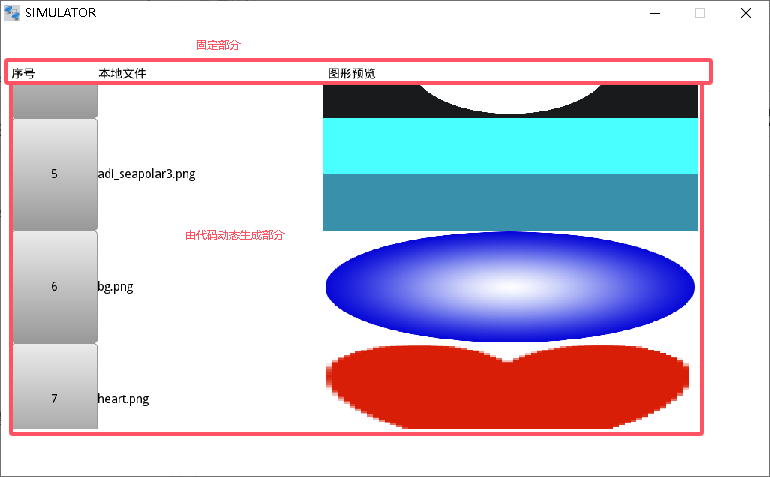
#include "Frm05.h" Frm05::Frm05(HmiApp* app, STTWidget *par, const string& id, const string& desc) : STTPage(app->getRuntime(), par, id, desc) { hmiApp = app; } Frm05::~Frm05() { } void Frm05::onInit() { } void Frm05::createParts() { setMainArg(0, 0, 1024, 600); setMainStyle(0, 0xffffff, 0xffffff, 0, 255, 0, 0xc0c0c0); /*----------------------------- Panel : wMPanel1 -----------------------------*/ wMPanel1 = new STTPanel(p_rt, this, "wMPanel1"); wMPanel1->setMainArg(13, 76, 996, 461, 0); wMPanel1->setMainStyle(0, 0xffffff, 0xffffff, GradDir::NONE, 255, 1, 0xc0c0c0); /*----------------------------- Label : wMLabel1 -----------------------------*/ wMLabel1 = new STTLabel(p_rt, this, "wMLabel1"); wMLabel1->setMainArg(13, 48, 117, 29, "序号", TextAlign::LEFT, LabelLongMode::CLIP, 30); wMLabel1->setFonts(0x0, 16, "文泉驿微米黑", 0); wMLabel1->setMainStyle(0, 0xffffff, 0xffffff, GradDir::NONE, 0, 0x0, 0); wMLabel1->setFormatText(TextAlign::LEFT, LabelLongMode::CLIP, 30); /*----------------------------- Label : wMLabel2 -----------------------------*/ wMLabel2 = new STTLabel(p_rt, this, "wMLabel2"); wMLabel2->setMainArg(129, 48, 307, 29, "本地文件", TextAlign::LEFT, LabelLongMode::CLIP, 30); wMLabel2->setFonts(0x0, 16, "文泉驿微米黑", 0); wMLabel2->setMainStyle(0, 0xffffff, 0xffffff, GradDir::NONE, 0, 0x0, 0); wMLabel2->setFormatText(TextAlign::LEFT, LabelLongMode::CLIP, 30); /*----------------------------- Label : wMLabel3 -----------------------------*/ wMLabel3 = new STTLabel(p_rt, this, "wMLabel3"); wMLabel3->setMainArg(435, 48, 573, 29, "图形预览", TextAlign::LEFT, LabelLongMode::CLIP, 30); wMLabel3->setFonts(0x0, 16, "文泉驿微米黑", 0); wMLabel3->setMainStyle(0, 0xffffff, 0xffffff, GradDir::NONE, 0, 0x0, 0); wMLabel3->setFormatText(TextAlign::LEFT, LabelLongMode::CLIP, 30); /*called after widget created.*/ return; //createParts END } void Frm05::onLoad() { vector<KV_Str_Str> files; stt::util::FileUtil::getPathContent("./res/pic", files); int i=0; for(KV_Str_Str kv: files) { //序号 int rowHeight = 150; int xx = 0; int yy = i * 150; STTButton * btn = new STTButton(p_rt, wMPanel1, "mybtn" + to_string(i), 0); btn->setMainArg(xx, yy, 115, rowHeight, false); btn->setPressedArg(to_string(i+1), 0x0, "文泉驿微米黑", 16, 0); btn->setPressedStyle(8, 255, 0xebebeb, 0x999999, 1, 1, 0x999999, 1, 0xebebeb); btn->setReleasedArg(to_string(i+1), 0x0, "文泉驿微米黑", 16, 0); btn->setReleasedStyle(5, 255, 0xebebeb, 0x999999, 1, 1, 0x999999, 1, 0xebebeb); //文件名称 STTLabel* lbl = new STTLabel(p_rt, wMPanel1, "mylbl" + to_string(i)); lbl->setMainArg(115, yy, 300, rowHeight, kv.k, TextAlign::LEFT, LabelLongMode::CLIP, 30); lbl->setFonts(0x0, 16, "文泉驿微米黑", 0); lbl->setMainStyle(0, 0xffffff, 0xffffff, GradDir::NONE, 0, 0x0, 0); lbl->setFormatText(TextAlign::LEFT, LabelLongMode::CLIP, 30); //预览 STTImage * img = new STTImage(p_rt, wMPanel1, "myimg" + to_string(i)); img->setMainArg(415, yy, 500, rowHeight); img->addStateImg("0","./res/pic/" + kv.k); i++; } } bool Frm05::onClosing() { return true; } void Frm05::onDispose() { }
需要确认型号或具体项目?联系技术支持 ↗