源码附件及视频在最后
1.三个控件(两个视频播放器,一个透明功能键)
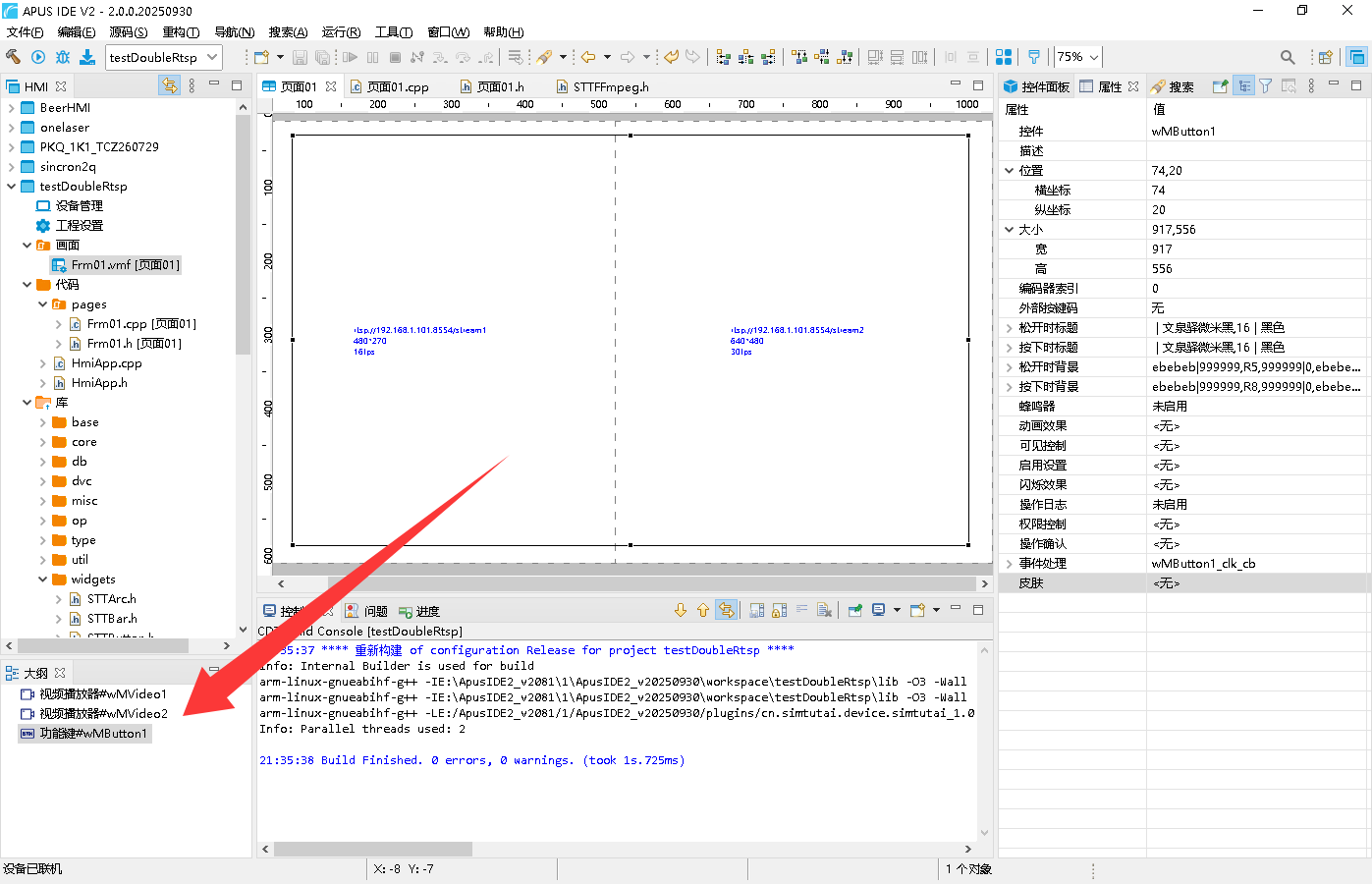
2.分别设置控件属性
2.1 第1路【视频播放器】的属性
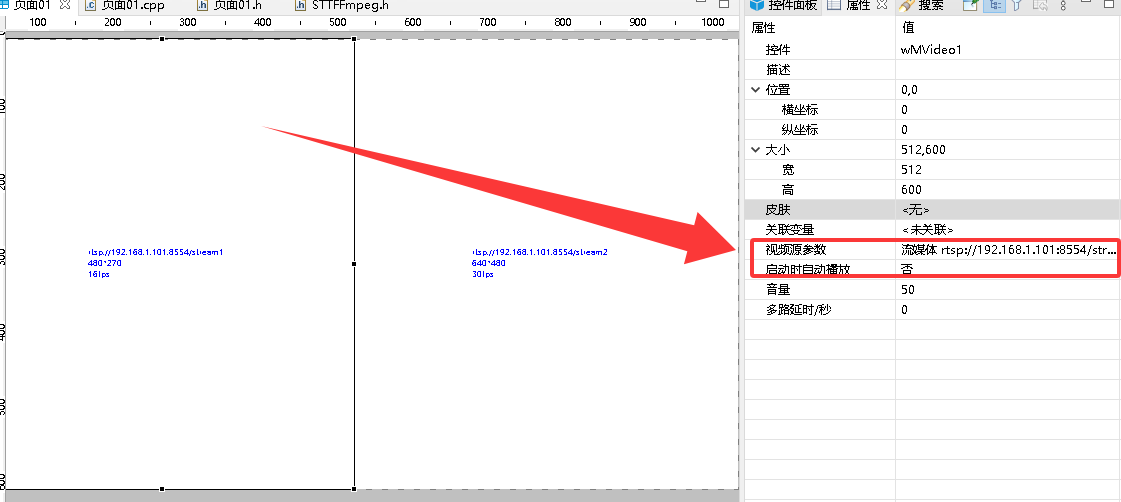
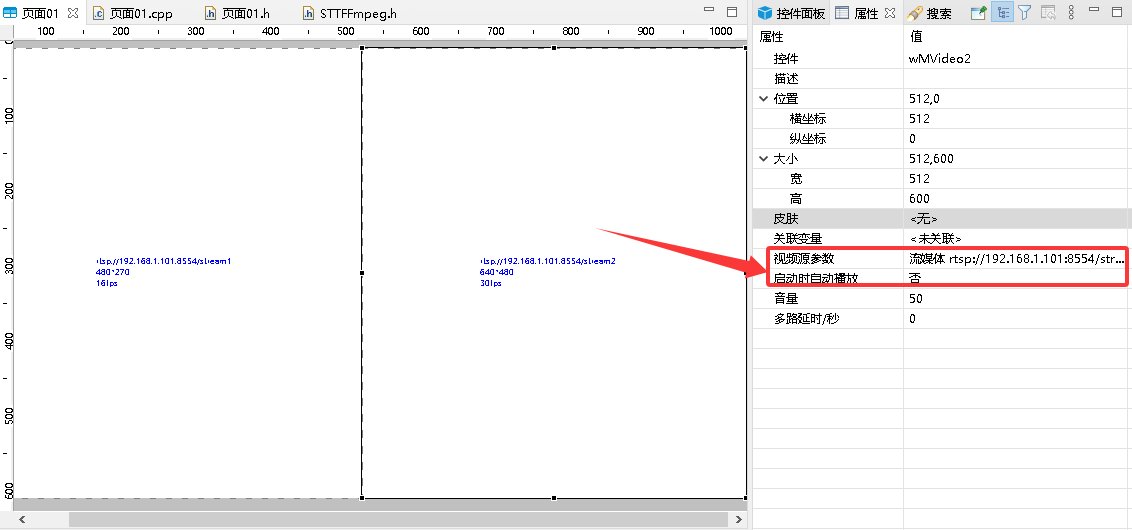
2.2 第2路【视频播放器】的属性
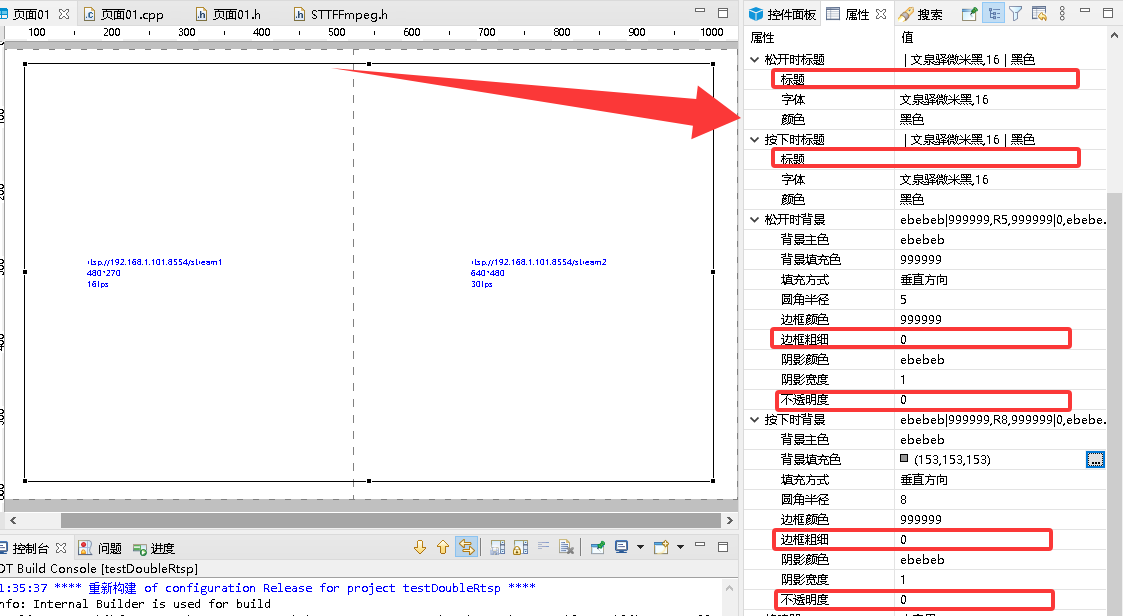
2.3 透明【功能键】属性
把边框设为0,透明度设为0,标题为空
3. 代码
主要是onLoad和功能键的点击事件代码
#include "Frm01.h" Frm01::Frm01(HmiApp* app, STTWidget *par, const string& id, const string& desc) : STTPage(app->getRuntime(), par, id, desc) { hmiApp = app; } Frm01::~Frm01() { } void Frm01::onInit(){ } void Frm01::createParts() { setMainArg(0, 0, 1024, 600); setMainStyle(0, 0xffffff, 0xffffff, 0, 255, 0, 0xc0c0c0); /*----------------------------- Video : wMVideo1 -----------------------------*/ wMVideo1 = new STTFFmpeg(p_rt, this, "wMVideo1"); wMVideo1->channel = 0; wMVideo1->setRotate(0); wMVideo1->setMainArg(50, 75, 412, 500, "rtsp://192.168.1.101:8554/stream1"); wMVideo1->setAutoRestart(true); wMVideo1->setVolume(50); /*----------------------------- Video : wMVideo2 -----------------------------*/ wMVideo2 = new STTFFmpeg(p_rt, this, "wMVideo2"); wMVideo2->channel = 1; wMVideo2->setRotate(0); wMVideo2->setMainArg(562, 75, 412, 500, "rtsp://192.168.1.101:8554/stream2"); wMVideo2->setAutoRestart(true); wMVideo2->setVolume(50); /*----------------------------- Button : wMButton1 -----------------------------*/ wMButton1 = new STTButton(p_rt, this, "wMButton1", 0); wMButton1->setMainArg(563, 10, 99, 47, false); wMButton1->setPressedArg("切换播放", 0x0, "文泉驿微米黑", 16, 0); wMButton1->setPressedStyle(8, 255, 0xebebeb, 0x999999, 1, 1, 0x999999, 1, 0xebebeb); wMButton1->setReleasedArg("切换播放", 0x0, "文泉驿微米黑", 16, 0); wMButton1->setReleasedStyle(5, 255, 0xebebeb, 0x999999, 1, 1, 0x999999, 1, 0xebebeb); wMButton1->onEventHandler(Event::CLICKED, this, (EHandler) &Frm01::wMButton1_clk_cb); /*----------------------------- Button : wMButton3 -----------------------------*/ wMButton3 = new STTButton(p_rt, this, "wMButton3", 0); wMButton3->setMainArg(363, 10, 98, 48, false); wMButton3->setPressedArg("双路播放", 0x0, "文泉驿微米黑", 16, 0); wMButton3->setPressedStyle(8, 255, 0xebebeb, 0x999999, 1, 1, 0x999999, 1, 0xebebeb); wMButton3->setReleasedArg("双路播放", 0x0, "文泉驿微米黑", 16, 0); wMButton3->setReleasedStyle(5, 255, 0xebebeb, 0x999999, 1, 1, 0x999999, 1, 0xebebeb); wMButton3->onEventHandler(Event::CLICKED, this, (EHandler) &Frm01::wMButton3_clk_cb); /*----------------------------- Button : wMButton4 -----------------------------*/ wMButton4 = new STTButton(p_rt, this, "wMButton4", 0); wMButton4->setMainArg(207, 11, 98, 48, false); wMButton4->setPressedArg("播放左路", 0x0, "文泉驿微米黑", 16, 0); wMButton4->setPressedStyle(8, 255, 0xebebeb, 0x999999, 1, 1, 0x999999, 1, 0xebebeb); wMButton4->setReleasedArg("播放左路", 0x0, "文泉驿微米黑", 16, 0); wMButton4->setReleasedStyle(5, 255, 0xebebeb, 0x999999, 1, 1, 0x999999, 1, 0xebebeb); wMButton4->onEventHandler(Event::CLICKED, this, (EHandler) &Frm01::wMButton4_clk_cb); /*----------------------------- Button : wMButton5 -----------------------------*/ wMButton5 = new STTButton(p_rt, this, "wMButton5", 0); wMButton5->setMainArg(719, 11, 98, 48, false); wMButton5->setPressedArg("播放右路", 0x0, "文泉驿微米黑", 16, 0); wMButton5->setPressedStyle(8, 255, 0xebebeb, 0x999999, 1, 1, 0x999999, 1, 0xebebeb); wMButton5->setReleasedArg("播放右路", 0x0, "文泉驿微米黑", 16, 0); wMButton5->setReleasedStyle(5, 255, 0xebebeb, 0x999999, 1, 1, 0x999999, 1, 0xebebeb); wMButton5->onEventHandler(Event::CLICKED, this, (EHandler) &Frm01::wMButton5_clk_cb); /*called after widget created.*/ return; //createParts END } void Frm01::onLoad(){ ENCODER::showCursor(false); wMVideo1->setVolume(5);//声音设小一点 wMVideo1->play(200);//不要自动启动,在onLoad里延时启动 wMVideo2->play(1000);//不要自动启动,在onLoad里延时启动 } bool Frm01::onClosing(){ return true; } void Frm01::onDispose(){ } //控制状态 static int iVideo = 0; void Frm01::wMButton1_clk_cb(uint16_t code, LvEvent e) { /*wMButton1()的点击事件*/ if(iVideo == 0) { //显示第1路视频:两个控件的地址都设为第1路视频地址 wMVideo1->setMainArg(50, 75, 924, 500, "rtsp://192.168.1.101:8554/stream1"); wMVideo2->setMainArg(50, 75, 924, 500, "rtsp://192.168.1.101:8554/stream1"); wMVideo1->play(200);//重新play一下,会刷新播放窗口大小 wMVideo2->play(1000);//重新play一下,会刷新播放窗口大小 } else if(iVideo == 1) { //显示第2路视频:两个控件的地址都设为第2路视频地址 wMVideo1->setMainArg(50, 75, 924, 500, "rtsp://192.168.1.101:8554/stream2"); wMVideo2->setMainArg(50, 75, 924, 500, "rtsp://192.168.1.101:8554/stream2"); wMVideo1->play(200);//重新play一下,会刷新播放窗口大小 wMVideo2->play(1000);//重新play一下,会刷新播放窗口大小 } else if(iVideo == 2) { //同时显示2路视频:两个控件的地址都设为第2路视频地址 wMVideo1->setMainArg(50, 75, 412, 500, "rtsp://192.168.1.101:8554/stream1"); wMVideo2->setMainArg(562, 75, 412, 500, "rtsp://192.168.1.101:8554/stream2"); wMVideo1->play(200);//重新play一下,会刷新播放窗口大小 wMVideo2->play(1000);//重新play一下,会刷新播放窗口大小 } iVideo++; iVideo %= 3; } void Frm01::wMButton4_clk_cb(uint16_t code, LvEvent e) { /*wMButton4(播放左路)的点击事件*/ //显示第1路视频:两个控件的地址都设为第1路视频地址 wMVideo1->setMainArg(50, 75, 924, 500, "rtsp://192.168.1.101:8554/stream1"); wMVideo2->setMainArg(50, 75, 924, 500, "rtsp://192.168.1.101:8554/stream1"); wMVideo1->play(200);//重新play一下,会刷新播放窗口大小 wMVideo2->play(1000);//重新play一下,会刷新播放窗口大小 iVideo = 1; } void Frm01::wMButton3_clk_cb(uint16_t code, LvEvent e) { /*wMButton3(双路播放)的点击事件*/ //同时显示2路视频:两个控件的地址都设为第2路视频地址 wMVideo1->setMainArg(50, 75, 412, 500, "rtsp://192.168.1.101:8554/stream1"); wMVideo2->setMainArg(562, 75, 412, 500, "rtsp://192.168.1.101:8554/stream2"); wMVideo1->play(200);//重新play一下,会刷新播放窗口大小 wMVideo2->play(1000);//重新play一下,会刷新播放窗口大小 iVideo = 0; } void Frm01::wMButton5_clk_cb(uint16_t code, LvEvent e) { /*wMButton5(播放右路)的点击事件*/ //显示第2路视频:两个控件的地址都设为第2路视频地址 wMVideo1->setMainArg(50, 75, 924, 500, "rtsp://192.168.1.101:8554/stream2"); wMVideo2->setMainArg(50, 75, 924, 500, "rtsp://192.168.1.101:8554/stream2"); wMVideo1->play(200);//重新play一下,会刷新播放窗口大小 wMVideo2->play(1000);//重新play一下,会刷新播放窗口大小 iVideo = 2; }
需要确认型号或具体项目?联系技术支持 ↗