
1 概述
使用图片的旋转、画布的绘制、仪表盘的使用,运行效果如下。
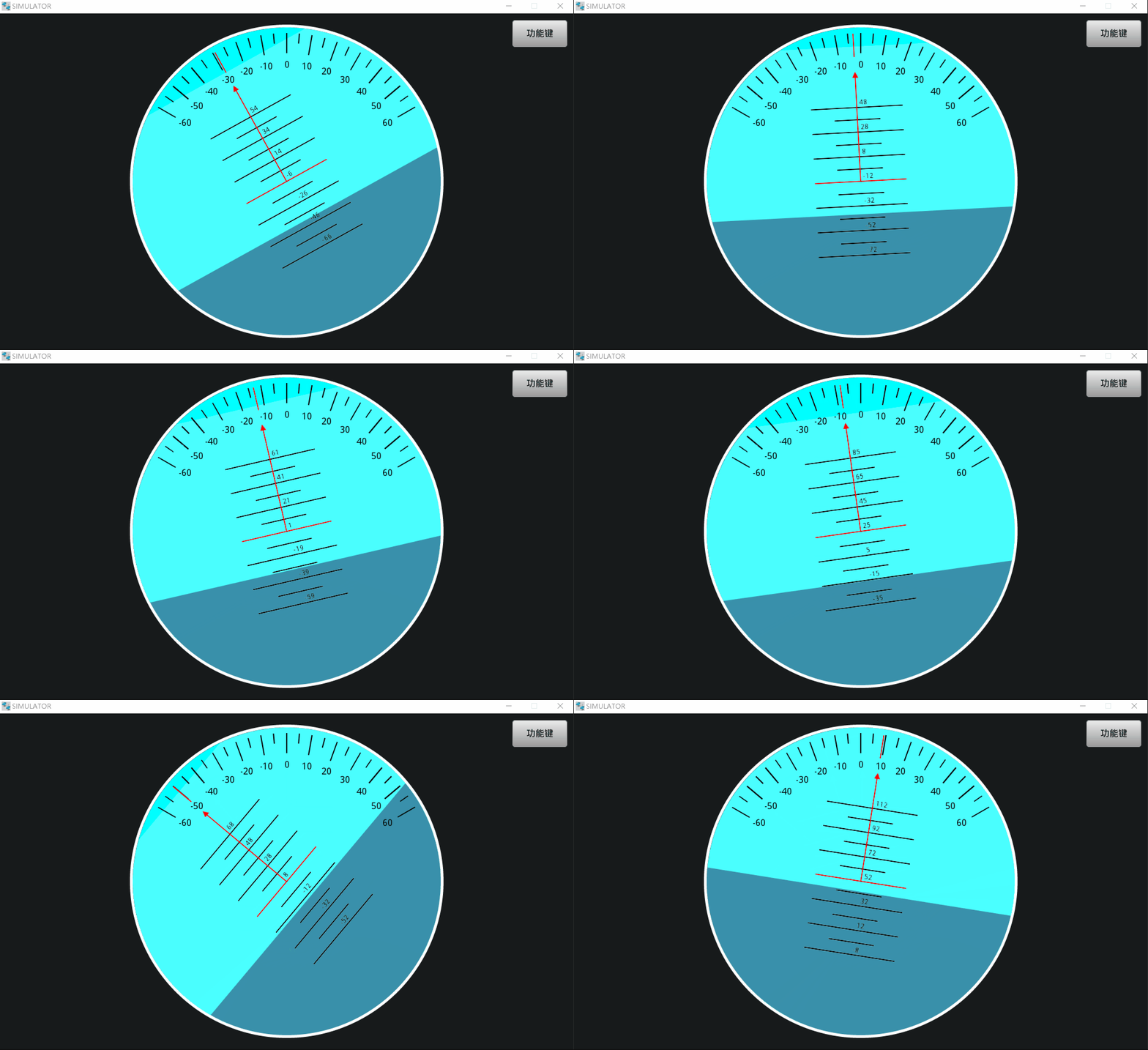
2 主要功能点
此演示工程展示以下功能:
1)图片的位置及旋转动画;
2)画布的绘制;
3)仪表盘的使用;
4)蒙板STTMask的使用。
3 源码下载与导入
1)下载地址:STTadi.zip
2)下载后解压,再导入到ApusIDE工作空间打开,具体操作请参考“项目导入”。
3)同步一下项目头文件
4)部分主要源码
#include "Frm01.h" Frm01::Frm01(HmiApp* app, STTWidget *par, const string& id, const string& desc) : STTPage(app->getRuntime(), par, id, desc) { hmiApp = app; } Frm01::~Frm01() { } void Frm01::onInit(){ } void Frm01::createParts() { setMainArg(0, 0, 1024, 600); setMainStyle(0, 0x0, 0xffffff, 0, 255, 0, 0xc0c0c0); /*----------------------------- Image : wMImage2 -----------------------------*/ wMImage2 = new STTImage(p_rt, this, "海平面色块"); wMImage2->setMainArg(0, 0, 1024, 600); wMImage2->addStateImg("0", "./images/img17452895724490_1024X600R0.png"); /*----------------------------- Canvas : wMCanvas1 -----------------------------*/ wMCanvas1 = new STTCanvas(p_rt, this, "用来绘制指针"); wMCanvas1->setMainArg(237, 25, 550, 550, 0xffffff, 0, ""); /*----------------------------- Canvas : wMCanvas2 -----------------------------*/ wMCanvas2 = new STTCanvas(p_rt, this, "用于保存画布1的图片然后传给指针"); wMCanvas2->setMainArg(237, 25, 550, 550, 0xffffff, 0, ""); /*----------------------------- Timer : wMTimer1 -----------------------------*/ wMTimer1 = new STTTimer(p_rt, this, "wMTimer1", false); wMTimer1->set(1000, 0)->start(); wMTimer1->onEventHandler(Event::READY, this, (EHandler) &Frm01::wMTimer1_timer_cb); /*----------------------------- Image : wMImage1 -----------------------------*/ wMImage1 = new STTImage(p_rt, this, "挖空圆"); wMImage1->setMainArg(0, 0, 1024, 600); wMImage1->addStateImg("0", "./images/img17452865736550_1024X600R0.png"); /*----------------------------- Button : wMButton1 -----------------------------*/ wMButton1 = new STTButton(p_rt, wMImage1, "wMButton1", 0); wMButton1->setMainArg(915, 12, 98, 48, false); wMButton1->setPressedArg("功能键", 0x0, "文泉驿微米黑", 16, 0); wMButton1->setPressedStyle(8, 255, 0xebebeb, 0x999999, 1, 1, 0x999999, 1, 0xebebeb); wMButton1->setReleasedArg("功能键", 0x0, "文泉驿微米黑", 16, 0); wMButton1->setReleasedStyle(5, 255, 0xebebeb, 0x999999, 1, 1, 0x999999, 1, 0xebebeb); wMButton1->onEventHandler(Event::CLICKED, this, (EHandler) &Frm01::wMButton1_clk_cb); /*----------------------------- Gauge : wMGauge1 -----------------------------*/ wMGauge1 = new STTMeter(p_rt, this, "wMGauge1"); wMGauge1->setGaugeMainArg(232, 20, 560, 560, 80, -60, 60, 120, true, true, 1, 0, 0); wMGauge1->setGaugeMainStyle(9999, 0x80ffff, 0xffffff, 0, 255, 5, 0xffffff, 0, 0x0); wMGauge1->setGaugeNeedleStyle(0xff0000, 0, 100, "./images/add_302X100R0.png", 0, 50, 50, -18); wMGauge1->setGaugeFont(0x0, 16, "文泉驿微米黑", 0); wMGauge1->setGaugeTickStyle(0xff0000, 0x0, 0x0, 2, 2, 18, 25); wMGauge1->setGaugeMajorTickStyle(2, 36, 10, 20); wMGauge1->setGaugeCircleStyle(9999, 0x0, 0xffffff, 0, 0, 0x0, 0, 0xffffff); /*called after widget created.*/ return; //createParts END } #include "util/StringUtil.h" #define ANIM_MS 500 //每次动画时长ms /** * 在canvas上绘制水平面高度比例、俯仰角、滚转角 */ static void drawadi(STTCanvas* canvas, double percent, double elevation, double roll, STTCanvas* canvas2, STTMeter* gauge) { int cx = canvas->getWidth() / 2; //画布中心 int cy = canvas->getHeight() / 2; //1.先清除原图,并画水平面 canvas->fillBg(0xffffff, 0); if(false) { //画海平面(没用了,用图片位置和旋转动画代替) LvDrawRectDsc rectdsc; rectdsc.bg_color.ch.alpha=0xff; rectdsc.bg_color.ch.blue=0xff; rectdsc.bg_color.ch.green=0; rectdsc.bg_color.ch.red=0x0; rectdsc.bg_opa = 255; rectdsc.radius = 9999; int xx = 0; int yy = canvas->getHeight()*(1-percent/100.0); int ww = canvas->getWidth(); int hh = canvas->getHeight() - yy; STTMask::addLine2(canvas, xx, yy, ww, yy, 3);//增加蒙板 STTMask::apply();//应用蒙板 canvas->drawRect(0, 0, ww, ww, &rectdsc);//在蒙板中绘制 STTMask::clear();//清除蒙板 } //2.画线 if(true) { int linelen = canvas->getWidth() * 3 / 10;//水平线长为宽度的n倍 int linegap = canvas->getHeight() / 24;//两条长短线的距离大约是高度的1/n //2.1横线 LvDrawLineDsc linedsc; linedsc.width = 2; for(int i =-6; i<=6; i++) { int y = cy + i * linegap; int x1 = 0; int x2 = 0; if(i%2==0) {//长线 x1 = cx - linelen/2; x2 = cx + linelen/2; string stmp = StringUtil::formatFloat((-i)*10 - elevation, 0, false); canvas->drawText(cx + 5, y - 16, 48, NULL, stmp.c_str()); } else {//短线 x1 = cx - linelen/4; x2 = cx + linelen/4; } if(i == 0) {//红线 linedsc.color.ch.alpha=0xff; linedsc.color.ch.blue=0x0; linedsc.color.ch.green=0; linedsc.color.ch.red=0xff; } else {//黑线 linedsc.color.ch.alpha=0xff; linedsc.color.ch.blue=0x0; linedsc.color.ch.green=0; linedsc.color.ch.red=0x0; } canvas->drawLine(x1, y, x2, y, &linedsc); } } //2.2向上的线和箭头 if(true) { LvDrawLineDsc linedsc; linedsc.width = 2; linedsc.color.ch.alpha=0xff; linedsc.color.ch.blue=0x0; linedsc.color.ch.green=0; linedsc.color.ch.red=0xff; int x1 = cx; int y1 = cy; int x2 = cx; int y2 = 5 + 12 + 36 + 16 + 12;//边框 边框到刻度线的间路 + 刻度线长 + 文字大小 + 刻度线与文字的间距 canvas->drawLine(x1, y1, x2, y2, &linedsc); //箭头 int xy[] = {x2,y2-2, x2-5,y2+8,x2+5,y2+8}; LvDrawRectDsc rectdsc; rectdsc.bg_color.ch.alpha=0xff; rectdsc.bg_color.ch.blue=0x0; rectdsc.bg_color.ch.green=0; rectdsc.bg_color.ch.red=0xff; rectdsc.bg_opa = 255; canvas->drawPolygon(xy, 3, &rectdsc); //外层的线 y1 = 5 + 12 + 36; y2 = 5 + 12 / 2; canvas->drawLine(x1, y1, x2, y2, &linedsc); } //3.把图片给到指针 canvas2->fillBg(0xffffff, 0); canvas2->transform(canvas->getImage(), 90, 1, 0, 0, cx, cy, true);//旋转90度,匹配指针方向 gauge->setGaugeNeedleStyle(0xff0000, roll, cx*2, (void*)canvas2->getImage(), 0, cx, cy, 0); //4.清除画布1 canvas->fillBg(0xffffff, 0); //5.隐藏画布2(指针上的图片是引用画布2的,所以不能清除) canvas2->setHidden(true); } void Frm01::onLoad(){ this->getStyle()->p_bg->setColor(0xffff);//整体背景色设为天空色 wMGauge1->setAnimTimeMs(ANIM_MS);//开启指针动画 wMGauge1->getStyle()->p_bg->setOpa(0);//仪表背景设为透明,显示天空与海面颜色 drawadi(wMCanvas1,0.5,0,0,wMCanvas2, wMGauge1);//初始绘制 } bool Frm01::onClosing(){ return true; } void Frm01::onDispose(){ } /**海平面位置*/ static void valuecb(void* obj, int32_t v) { STTImage* widget = (STTImage*)obj; widget->setY(v);//Y坐标不停的变化 } /**海平面角度*/ static void valuecb2(void* obj, int32_t v) { STTImage* widget = (STTImage*)obj; widget->setAngle(v); } static int lasty = 0;//上次海平面位置 static int lasta = 0;//上次海平面角度 void Frm01::wMTimer1_timer_cb(uint16_t code, LvEvent e) { int ipercent = std::rand() % 101; int ielevation = std::rand() % 121 - 60; int roll = std::rand() % 121 - 60; drawadi(wMCanvas1, ipercent, ielevation, roll, wMCanvas2, wMGauge1); //海平面位置动画 int iy = ipercent; wMImage2->getStyle()->p_anim->doAnim(wMImage2, lasty, iy, ANIM_MS, valuecb, NULL, 0); lasty = iy; //海平面角度动画 int ia = roll; wMImage2->getStyle()->p_anim->doAnim(wMImage2, lasta, ia, ANIM_MS, valuecb2, NULL, 0); lasta = ia; } void Frm01::wMButton1_clk_cb(uint16_t code, LvEvent e) { /*wMButton1(功能键)的点击事件*/ int ipercent = std::rand() % 61;//海平面位置,应该和俯仰角有计算关系,这里暂时用随机数代替 int ielevation = std::rand() % 121 - 60;//俯仰角 int roll = std::rand() % 121 - 60;//翻滚角,与指针角度相关,海平面的角度与其一致 drawadi(wMCanvas1, ipercent, ielevation, roll, wMCanvas2, wMGauge1); //海平面位置动画 int iy = ipercent; wMImage2->getStyle()->p_anim->doAnim(wMImage2, lasty, iy, ANIM_MS, valuecb, NULL, 0); lasty = iy; //海平面角度动画 int ia = roll; wMImage2->getStyle()->p_anim->doAnim(wMImage2, lasta, ia, ANIM_MS, valuecb2, NULL, 0); lasta = ia; }